
One Shot to Give It Away: How LBC Turns a Short Video into a Giveaway Card
The Things in Your Drawer
Almost everyone has a few things they no longer use. An old smartwatch. A spare phone. A jacket that doesn’t fit. They still work. They still have value. And most of them stay in a drawer, because giving them away feels like work.
It is work. You take a few photos. You work out what to call the item. You write a description. You try to make the post look decent. You find the right group to post it in. By the time you are done, it is easier to leave the thing where it is.
LBC Giveaway is built to remove those steps.
One Shot
Switch LBC to Giveaway mode in Settings, point the camera at the item, and record a short video of up to 9 seconds, or take a photo. That is the whole job.
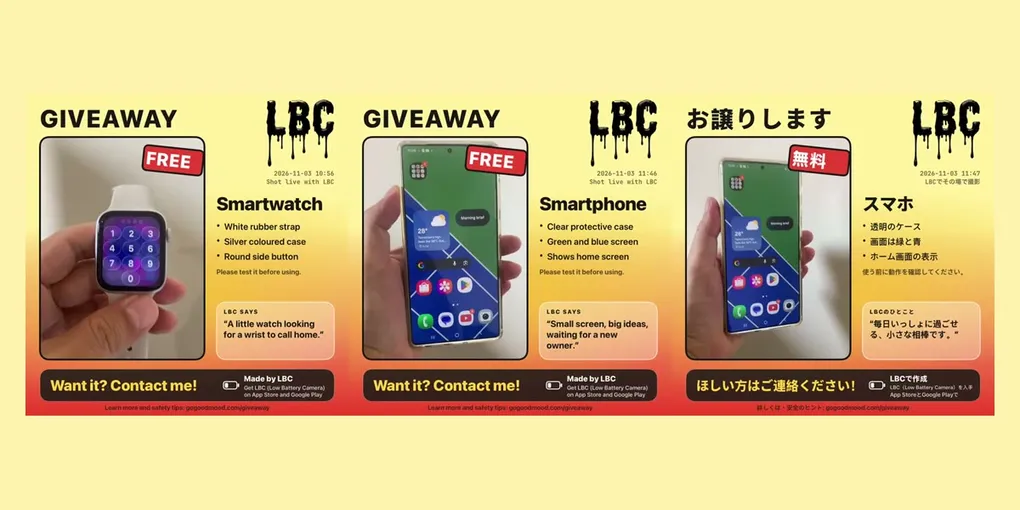
LBC turns that one shot into a square, ready-to-share card with:
- the photo or video of the item,
- an item name,
- a few short facts about it,
- a friendly comment from LBC,
- a big FREE stamp,
- the date and time it was shot.
Here is a smartwatch, shot once, in a few seconds:
The card names the item (“Smartwatch”), lists what you can see (white rubber strap, silver coloured case, round side button), reminds the receiver to test it before using, and adds a comment: “A little watch looking for a wrist to call home.”
Here is the same thing with a smartphone:
Before and After
The usual way
- Take several photos.
- Work out what the item is called.
- Write a description.
- Design or format a post.
- Share it.
With LBC Giveaway
- Shoot it once.
- Share the card.
You can edit every word on the card before you share it, so the shortcut never takes control away from you.
A Card in Your Own Language
People give things away to the people around them, and those people don’t always read English. LBC lets you choose the language of the card. The choice is saved, so you only make it once.
This is the smartphone card again, written in Japanese. The stamp, the facts, the comment and the “contact me” line are all in the chosen language:
Only the website address and the LBC name stay the same on every card, so anyone who sees it can find out more.
Fill with AI, Only If You Want It
The text on the card comes from Fill with AI, which is optional and only runs when you tap it. When you do, LBC sends a small copy of your photo, or a few frames from your video, to our server, which passes it to Claude, an AI model from Anthropic, to write the text. Our server does not keep your photo.
The AI can get things wrong, because it only sees a picture. It cannot know whether an item works or is safe, which is why the card says to test it first. Read the text before you share, and fix anything that isn’t true. Without Fill with AI, the card uses general wording you can edit, and everything else works the same.
You Stay in Charge of the Handover
LBC only makes the card. It is not a marketplace, and it is not part of the handover. The card carries no contact details. You share it yourself, for example in WhatsApp, Instagram or Facebook, and anyone who wants the item contacts you directly.
A few things we ask of everyone:
- Meet in a public place, and tell someone where you are going.
- Check the background of your video for faces, papers and screens before you share.
- Be honest about damage and about whether the item works.
- Don’t give away medicine, weapons, alcohol, live animals or anything unsafe or stolen.
The full rules and safety tips are on the LBC Giveaway page.
Why We Care About Giving
Things carry value. A working phone or watch sitting in a drawer is value that isn’t helping anyone. For the person who receives it, it might be a first smartwatch, a spare phone for a child, or simply something they could not afford new.
We don’t claim an app can fix inequality. But every item that moves from a drawer to a person who needs it is a small, real act of sharing what we already have. The main thing that stops it from happening is how many steps it takes. If we can make giving away take seconds, more people will do it, and that is our small part in spreading what we have more fairly.
LBC also has For Sale and Swap modes, built the same way, for when you want something back. Giveaway is where we started, and it is the one we care about most.
Try It
LBC (Low Battery Camera) is available for iPhone and Android. Giveaway mode and Fill with AI are in both.
- LBC for iPhone on the App Store
- LBC for Android on Google Play
- How Giveaway works, the rules and safety tips
- More about LBC
Next time you look at something you no longer use, shoot it once and let someone else enjoy it.